
NimbleRx
NimbleRx, Inc.Medical
4.82.25K Reviews
- Version
- 26.765.1
- Installs
- 500.00K
- Age Rating
- Everyone
Screenshots
Our Review of NimbleRx
 Analysis by Appyee
Managing prescriptions is one of those tasks that looks simple until a refill is due, a pharmacy changes its hours, or you need to remember whether a request has already been made. NimbleRx is a medical app built around making that part of everyday life less awkward. I found its appeal less in flashy extras and more in the idea of bringing prescription-related errands into one place instead of relying on phone calls, paper notes, and repeated trips.
NimbleRx is free, developed by NimbleRx, Inc., and intended for everyone. It has reached over 500 thousand installs, with an average rating of 4.8 from around 29 thousand ratings and roughly 1.9 thousand written reviews. Those numbers suggest that the basic pharmacy workflow is resonating with a substantial group of users, although a high store rating should be treated as a starting point rather than a guarantee that every local pharmacy experience will feel identical.
What I would consider before moving prescription tasks into an app
My first decision criterion would be whether your pharmacy is actually supported in the way you need. A pharmacy app can be beautifully designed and still be a poor fit if your preferred pharmacy does not participate, if your prescriptions are handled elsewhere, or if you normally need a pharmacist for every step. NimbleRx makes the most sense when it can become part of your existing pharmacy routine rather than sitting beside it as another disconnected tool.
The second question is what kind of help you want. If you only pick up medication occasionally and already have a system that works, installing another app may not save much effort. If you regularly request refills, coordinate medication for a family member, or dislike making routine calls, a dedicated pharmacy app has a clearer purpose. I would judge it by how much friction it removes from those repeated jobs, not by how many screens or settings it offers.
There is also a privacy and responsibility consideration. This is a medical app, so I would use it for organizing pharmacy interactions, but I would not treat it as a replacement for a pharmacist, prescriber, or urgent medical service. Prescription status and pharmacy communication are practical matters; questions about side effects, dosage changes, interactions, or missed medication still belong with a qualified healthcare professional.
Compatibility matters too. NimbleRx supports Android devices running version 8.0 or later, which covers many older phones but not every device still in use. The current version is 26.564.1. Before building your routine around it, I would check that your phone can install and run the app comfortably, especially if it is an older model with limited storage or an outdated system.
The everyday problem it is trying to solve
Imagine a weekday evening when you notice that a regular prescription is running low. The traditional route might involve finding the pharmacy number, waiting for an answer, explaining which medication you need, and then remembering when to return or call again. With NimbleRx, the useful promise is a more organized path for handling that request through a phone rather than starting from a blank conversation each time.
That scenario is especially relevant for people who take several regular prescriptions. The difficulty is not always the medical complexity; it is the small administrative details. You may be at work, caring for a child, traveling between appointments, or simply trying to avoid another queue. A pharmacy-focused app can give those tasks a clearer place in your day, provided your local pharmacy connection works smoothly.
I also see value for someone helping a relative. Family medication routines often involve reminders, phone calls, and checking whether a prescription is ready. NimbleRx may reduce some of that back-and-forth by making the pharmacy side easier to manage from a mobile device. I would still keep the patient and pharmacist involved when anything is unclear, but an app can make the routine request less dependent on one person remembering every detail.
Where NimbleRx feels strongest
The strongest part of this product is its focus. It is not trying to be a general wellness dashboard, a symptom checker, or a broad health encyclopedia. Its identity is tied to the pharmacy experience, which gives it a practical reason to exist. When I use a specialized tool for a repeated errand, I generally prefer that over a general-purpose notes app because the context is already built around the task.
That focus also makes the app easier to evaluate. You do not need to ask whether it will transform your entire health routine. The better question is whether it can make prescription-related administration less annoying. For many users, that is enough. A small reduction in phone calls or uncertainty can be worthwhile when the same task comes back every month.
Another strength is the low financial barrier. NimbleRx is free, so trying it does not require committing money before you know whether it fits your pharmacy routine. That is useful because the real test is local and personal: the app may feel highly convenient for one user and only moderately helpful for another, depending on pharmacy participation and the complexity of the prescriptions involved.
I would also give it credit for being approachable to a broad audience. Its Everyone age rating reflects the fact that pharmacy management is not limited to one age group. Younger adults managing their first recurring prescription, parents coordinating household medication, and older users who prefer a phone-based process can all understand the basic reason to use it. The important distinction is that ease of purpose does not automatically mean every screen will be equally comfortable for every user.
Small workflow choices that can make a real difference
My first practical tip is to set up the app when you are not already under time pressure. Installing it while you are standing at a pharmacy counter or trying to solve an urgent refill problem is a poor test. Start with a routine prescription, confirm that your pharmacy relationship is represented correctly, and learn the flow before you depend on it for something time-sensitive.
Second, use it as a tracking aid rather than as permission to delay planning. A digital request is still part of a real pharmacy process, and the safest habit is to begin early enough to allow for questions, availability issues, or a needed conversation with the pharmacy. The app can organize an action; it cannot remove every real-world delay between a request and medication in hand.
Third, keep your medication information tidy. If you manage several prescriptions, similar names can become confusing, especially when one medication has different strengths or instructions. I would slow down during setup and verify the item carefully instead of selecting the first familiar-looking option. That extra attention is more important than speed, because an app should reduce administrative mistakes rather than encourage rushed taps.
A fourth useful habit is to keep a backup understanding of your pharmacy’s normal process. Know how to contact the pharmacy directly and what to do if an app request appears unclear. This is not a criticism unique to NimbleRx; it is good practice with any digital health service. Technology should provide another route, not leave you stranded when a login problem, device issue, or unusual prescription question appears.
What may still feel inconvenient
The biggest limitation is that the quality of the experience depends on the relationship between the app and the pharmacy handling your prescription. A mobile interface cannot compensate for a pharmacy that does not support the workflow you need. If your prescriptions are split across several pharmacies, you may also find that the app does not eliminate all of your administrative work. In that situation, a direct call or a pharmacy-specific system may remain necessary.
There is also a learning curve, even if it is modest. People who already use a reliable reminder, calendar, or pharmacy phone routine may not immediately feel a dramatic improvement. The benefit grows when the app becomes the place you naturally check and use. If you install it but continue to make every request through other channels, it becomes another icon rather than a solution.
I would not choose NimbleRx as my only source of medical guidance. It is suitable for pharmacy-related organization, but it should not be used to interpret symptoms, decide whether to change a dose, or replace professional advice. Someone looking for medication education, appointment management, remote consultation, or detailed health records may need a different type of medical app alongside it.
How it compares with the usual alternatives
The most obvious alternative is calling the pharmacy. A phone call is still better when a prescription is unusual, a pharmacist needs to answer a question, or something has gone wrong. It gives you a direct human conversation and can resolve ambiguity faster than an app. NimbleRx is more attractive for repeatable, administrative requests where you already know what you need and would rather avoid waiting on the phone.
Another alternative is using the pharmacy’s own app or website. That route may be better if you want a deep connection to one particular pharmacy’s broader services. On the other hand, a dedicated pharmacy experience such as NimbleRx can be appealing when its workflow matches your needs and you want a straightforward mobile option rather than a larger healthcare portal with many unrelated sections. I would compare them based on the pharmacy you actually use, not on general reputation.
Some people rely on a notes app, calendar, or paper list. Those tools can be excellent for remembering dates and recording questions, but they do not necessarily connect the reminder to the pharmacy action. NimbleRx is the better fit when you want the organizational step and the pharmacy request to live closer together. A notes app remains preferable for people who only need a private medication checklist and do not want another account or service involved.
There are also broader medication-management apps. These may be more suitable if your main concern is dose reminders, symptom journaling, or keeping a detailed personal health log. NimbleRx has a narrower purpose, and that is both its advantage and its boundary. I would choose it for pharmacy logistics, not because I expect it to replace every other health tool on my phone.
The real cost of switching
Because the app is free, the main cost is not financial. It is the time needed to set up a new routine, confirm the right pharmacy details, and remember to use the app consistently. For a person with one occasional prescription, that setup may feel like more work than the problem deserves. For someone with recurring refills, the same investment can pay off through repetition.
There is also a mental switching cost. Every new health app creates another place to check, another login to remember, and another process to explain to a family member. I would avoid adopting NimbleRx simply because it has a strong rating. I would adopt it after identifying one repeated pharmacy task that currently causes friction, then seeing whether the app handles that task more cleanly than your existing method.
If you decide to switch, do it gradually. Keep your usual pharmacy contact method available during the first cycle, and do not wait until medication is nearly finished to test the process. This approach lets you discover whether the app fits your local routine without turning the experiment into a stressful deadline. Once it proves dependable for ordinary requests, you can decide whether it deserves a permanent place in your health toolkit.
Who should use it, and who should skip it
I would recommend NimbleRx to people who want a free, focused way to handle recurring pharmacy tasks from an Android phone, especially when phone calls and repeated trips are the part they dislike most. It is also worth trying for caregivers who help coordinate routine prescriptions, as long as they remain careful about patient details and involve the pharmacist whenever a request is not straightforward.
I would be more cautious if you use multiple pharmacies, need frequent clinical advice, or prefer speaking with a person for every medication question. The app is not the best answer for urgent needs, complicated prescription changes, or anyone expecting a complete medical record and consultation service. In those cases, direct pharmacy contact or a broader healthcare service may be the better choice.
For iPhone users, the sensible step is to check the current availability and compatibility for their device before committing to a workflow. For Android users, the minimum operating system is Android 8.0, and the current release is 26.564.1. Either way, the deciding factor remains practical usefulness: can it handle the pharmacy interaction you actually need, with the pharmacy you actually use?
My recommendation after weighing the trade-offs
NimbleRx is a convincing choice when your problem is ordinary prescription administration rather than medical decision-making. I like its focused purpose, free access, and potential to replace some repetitive pharmacy friction with a more manageable phone-based routine. Its 4.8 average and broad install base make it reasonable to try, but I would still judge it by one local test instead of assuming the same experience everywhere.
My recommendation is to install it before your next routine refill, explore the process calmly, and keep direct pharmacy contact available until you trust the workflow. If it saves you repeated calls or makes family medication coordination clearer, it has earned its place. If your pharmacy is not a good match, or if your needs are mainly reminders and clinical advice, another tool will serve you better.
The best reason to choose NimbleRx is not that it promises to manage your whole health life; it is that it can make one recurring pharmacy job easier. That narrower promise is also the key to using it well. Treat it as a practical pharmacy companion, verify important details, and rely on healthcare professionals for anything that goes beyond routine organization.
Privacy and Permissions
See what permissions an app requests and how it handles your data.
- Contacts
- modify your contacts
- Photos/Media/Files
- read the contents of your USB storage, modify or delete the contents of your USB storage
- Storage
- read the contents of your USB storage, modify or delete the contents of your USB storage
- Camera
- take pictures and videos
- Microphone
- record audio
- Other
- view network connections, full network access, run at startup, control vibration, prevent device from sleeping
Verdict
Strengths of NimbleRx
- Easy prescription ordering and refill management
- Home delivery can save time and reduce pharmacy visits
- Medication reminders help support consistent treatment routines
- Useful prescription tracking and status updates
- Connects users with participating local pharmacies
Limitations of NimbleRx
- Availability depends on participating pharmacies and service areas
- Delivery fees or insurance restrictions may apply
- Some prescriptions may require extra verification
- Delivery times can vary for urgent medications
- App usefulness is limited if your pharmacy is unsupported
Similar Picks in This Category
View All
WebMD: Symptom Checker
WebMD, LLC4.1

Microphone Amplifier
DOSA Apps4.2

Anatomy Learning - 3D Anatomy
3D Medical OU4.5

Period Tracker and Calendar
SimpleInnovation4.9

GoodRx: Prescription Coupons
GoodRx4.8

CVS Health
CVS Pharmacy4.5
Frequently Asked Questions
What is NimbleRx and what can I use it for?
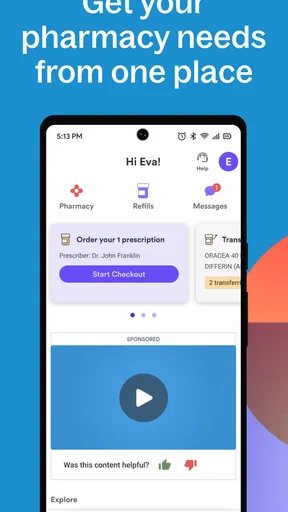
NimbleRx is a prescription-management and pharmacy-delivery service designed to help users request refills, organize medications, and receive eligible prescriptions at home. Depending on your location and participating pharmacy, the app may also provide prescription status updates, delivery scheduling, medication reminders, and communication with pharmacy staff. Availability and features can vary by state, pharmacy, insurance plan, and medication type.
Can I use NimbleRx with my current pharmacy and insurance?
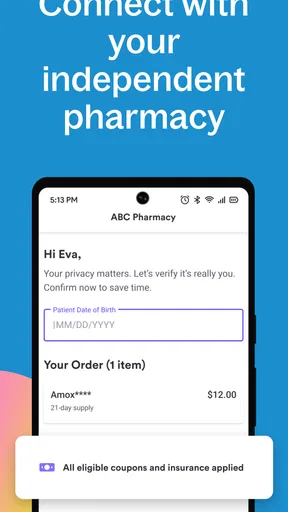
NimbleRx works with participating pharmacies rather than every pharmacy automatically. During setup, you generally need to select or connect an eligible pharmacy and provide information required to identify your prescriptions. Insurance processing may be supported through the pharmacy, but coverage, copay amounts, prior authorization, and eligibility are determined by your insurance provider. Check the app before relying on it for a specific prescription.
How do I order prescription refills through NimbleRx?
After creating an account and verifying your information, you can typically search for available prescriptions, request a refill, and choose an eligible pickup or delivery option. Some prescriptions may require approval from the pharmacy or a new authorization from your doctor. Controlled substances, refrigerated products, specialty medications, and prescriptions with remaining refill restrictions may follow different procedures or be unavailable through the app.
How does prescription delivery work, and can I track my order?
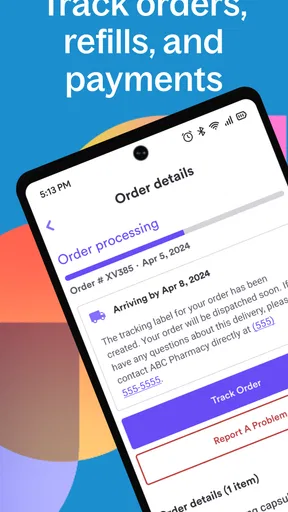
Delivery options depend on the pharmacy, your address, local service coverage, medication requirements, and the selected delivery window. NimbleRx may show order progress or status updates, but delivery times are not guaranteed and can be affected by pharmacy processing, insurance issues, weather, or courier delays. Make sure your address and contact details are accurate and follow any identity or signature requirements.
Is NimbleRx safe for managing my medications and personal information?
NimbleRx handles sensitive health, prescription, payment, and contact information, so users should review its privacy policy and app permissions before signing up. Use a strong, unique password and avoid sharing account credentials. The app can help with convenience and organization, but it does not replace advice from a doctor or pharmacist. Contact a healthcare professional for dosage questions, side effects, urgent needs, or medication changes.
